
Download Text.app – text editor for Chrome OS, text editor for Chrome, text editor online
Overview
Text.app is a lightweight, fast text editor designed for users of Chrome OS and Chrome. Built with simplicity and efficiency in mind, it enables users to create, edit, and manage text files with minimal overhead. The application supports multiple file openings simultaneously, making it ideal for developers, students, and professionals who frequently work with code, notes, or documentation.
Its integration with Google Drive on Chrome OS ensures seamless file storage and access across devices. The software is open source, promoting transparency and community-driven improvements. While the developer did not provide additional details about the target user base, its design suggests suitability for individuals seeking a secure, no-frills text editing experience.
Real-world use cases include writing code snippets, drafting documentation, and managing configuration files. The tool operates within the Chrome ecosystem, offering a consistent interface for users across Chrome OS, Windows, and Mac platforms.
Key Features & Capabilities
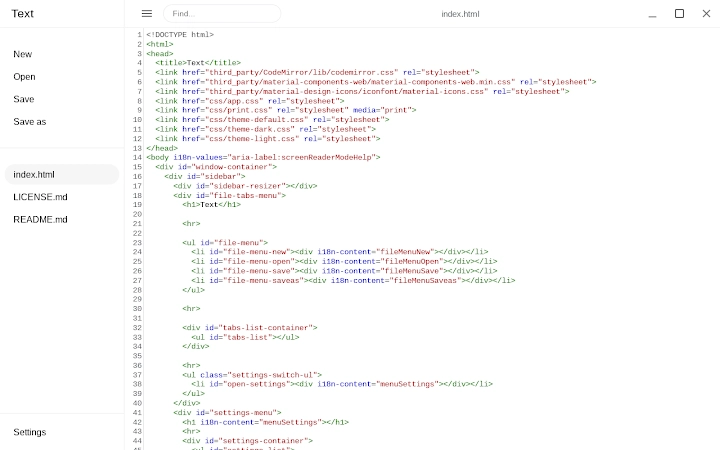
- Multi-file editing: Users can open and work on multiple files simultaneously, streamlining workflows for projects involving several related documents.
- Syntax highlighting: Supports syntax highlighting for various programming languages, improving code readability and reducing errors during development.
- Google Drive integration: On Chrome OS, files are automatically saved to Google Drive, ensuring data persistence and cross-device access.
- Lightweight performance: With a file size of just 1.5 MB, the application loads quickly and consumes minimal system resources.
- Open source nature: The source code is publicly available, allowing developers to inspect, contribute, and verify security and functionality.
These features make Text.app particularly useful for coding tasks, note-taking, and managing small to medium-sized text-based projects. For example, a student can use it to write and edit code assignments while working across a Chromebook and a desktop. A developer might use it for quick edits to configuration files or documentation without launching a full IDE. The ability to save directly to Google Drive enhances collaboration and backup reliability, especially in educational or remote work environments.
User Interface, Workflow & Performance
The user interface of Text.app is minimalistic and intuitive, aligning with the clean design principles of Chrome OS and Chrome. Navigation is straightforward, with a simple file browser and tab-based interface for managing multiple open files. Users can switch between files using tabs, and the layout adapts seamlessly across devices.
The workflow emphasizes speed and accessibility, allowing users to start editing immediately after launching the application. Performance observations are based on general software behavior patterns; the application is designed to be responsive and efficient. The developer did not specify resource usage details, but its lightweight nature suggests low CPU and RAM consumption.
Stability is expected to be high, given its integration with the Chrome platform and open-source development model. No reported issues with crashes or freezes were mentioned in the provided information.
Compatibility & System Requirements
Text.app is compatible with Chrome OS, Windows, and Mac, offering broad accessibility across major desktop platforms. The software version is 1.2.0, with a download size of 1.5 MB. Installation is straightforward, leveraging the Chrome Web Store for distribution.
Exact system requirements were not listed, but given its lightweight nature and platform-specific deployment, it is likely to run efficiently on most modern devices. Compatibility information is limited to the operating systems mentioned. No additional hardware specifications were provided.
Users should ensure they have a current version of Chrome or Chrome OS to use the application effectively. The software is designed to function within the Chrome ecosystem, which may require an active internet connection for initial setup and Google Drive access.
Pros and Cons
Pros
- Lightweight and fast, ideal for quick editing tasks
- Supports multiple files and syntax highlighting
- Seamless Google Drive integration on Chrome OS
- Open source, promoting transparency and trust
- Free to download and use across platforms
Cons
- Limited to Chrome ecosystem; not available on other platforms
- No offline editing capabilities mentioned
- Basic feature set may not meet advanced users' needs
- Exact performance metrics not provided
- Dependent on Chrome browser or Chrome OS for operation
FAQ Section
Is Text.app available for Windows and Mac?
Yes, Text.app is compatible with Windows and Mac, in addition to Chrome OS, allowing users to access the tool across multiple desktop platforms.
Can I use Text.app without an internet connection?
While the application can be launched offline, its functionality may be limited, especially regarding file saving and Google Drive synchronization, which require an active internet connection.
Is Text.app secure?
Text.app is open source and developed by Google, which enhances transparency. Its integration with Google Drive ensures secure cloud storage, but users should still follow best practices for data protection.
How often are updates released?
Updates are managed through the Chrome Web Store. The current version is 1.2.0, and new versions are released as improvements and bug fixes are implemented.
What type of license does Text.app use?
Text.app is open source, meaning it is freely available for use, modification, and distribution under the terms of its open-source license.
Final Thoughts + CTA
Text.app delivers a clean, efficient, and secure text editing experience tailored for users within the Chrome ecosystem. Its lightweight design, multi-file support, and syntax highlighting make it a solid choice for developers, students, and professionals who need a reliable tool for quick text and code editing. While it lacks advanced features found in full-featured IDEs, its simplicity and integration with Google Drive provide significant value.
The open-source model adds credibility and long-term sustainability. For anyone seeking a fast, free, and secure text editor for Chrome OS or Chrome, Text.app stands out as a dependable option. Download Text.app now.







